XPUSYS-Monitor-NG
AMD GPU metrics inside ComfyUI, native Windows ROCm
If you are running ComfyUI on a native Windows AMD ROCm stack, you already know the drill. You fought through driver versions, you probably ran a bootstrap script or two, and you got it working. But there is one thing Windows still does not give you: a proper look at what your AMD GPU is doing while a generation runs.
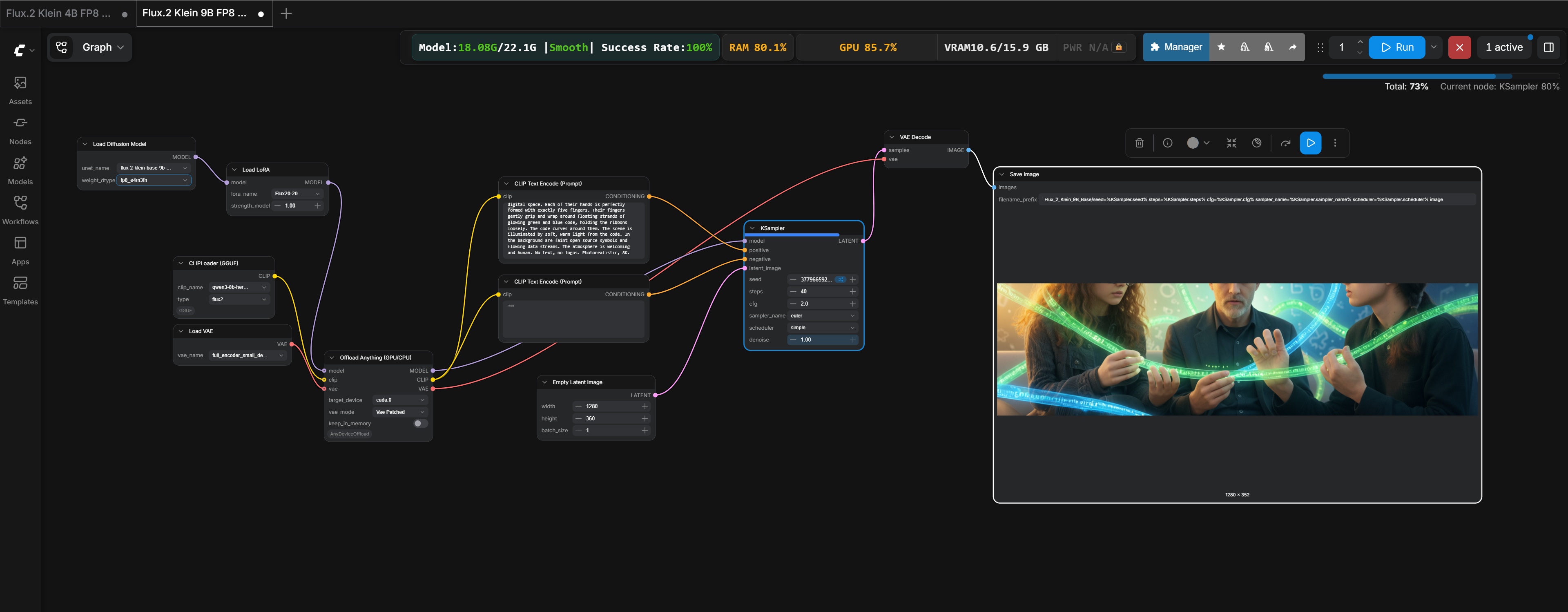
Task Manager barely shows AMD metrics. Tools like rocm-smi are Linux-only. HWInfo is a separate window you tab out to. This custom node puts the numbers where they belong: inside ComfyUI, next to your workflow.
Core utilization and VRAM usage for you AMD card updated in real time, displayed in the node graph. It uses the AMD ADL (ADLX) SDK to read the sensors directly.
v1.x - Windows AMD ROCm, ComfyUI custom node
What it shows
- CPU load
- GPU load
- RAM utlization
- VRAM utilization
- Breakdown of model memory usage
- Success rate
Why it exists
After getting ComfyUI running on a native Windows AMD stack, I realized there was no good way to monitor GPU performance without switching windows or running Linux tools that don't work here. ADLX gives accurate sensor data on Windows. The node just reads it and puts it in the UI. One file into custom_nodes/, no extra tooling needed.
Based on the excellent project by allanmeng, who built the original. A solid piece of work that deserved a second life for all us users on a native Windows ROCm stack.